
If you are looking for an automotive diagnostic scanner that goes well beyond basic OBD2 code reading, the Autel MaxiCheck MX900 sits in an interesting part of the market. It is more capable than a basic code reader, but it is not positioned as one of Autel’s most expensive professional diagnostic tablets.
That makes the MX900 particularly interesting for DIY mechanics, serious vehicle owners, mobile technicians, and smaller repair shops that need more advanced diagnostics without immediately moving into Autel’s high-end MaxiSYS range.
The bigger question is whether the MX900 actually offers the right balance of diagnostic capability, service functions, hardware, and long-term ownership cost for your needs.
In this review, we’ll look at what the MX900 offers, where it fits in Autel’s lineup, what it does particularly well, and who should consider spending the money on it.
Important: This review is based primarily on the current specifications, features, product information, and comparison data published by Autel-US. It is not presented as an independent hands-on laboratory test.
Link coupon: https://dealvit.com/store/autel-us
Autel MX900 at a Glance
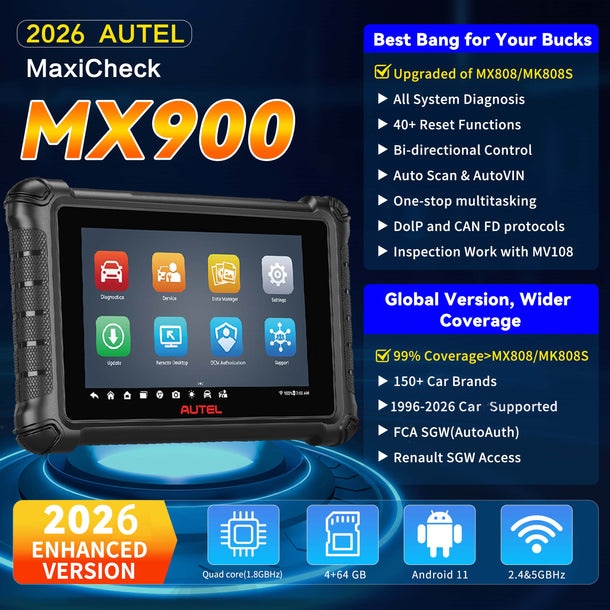
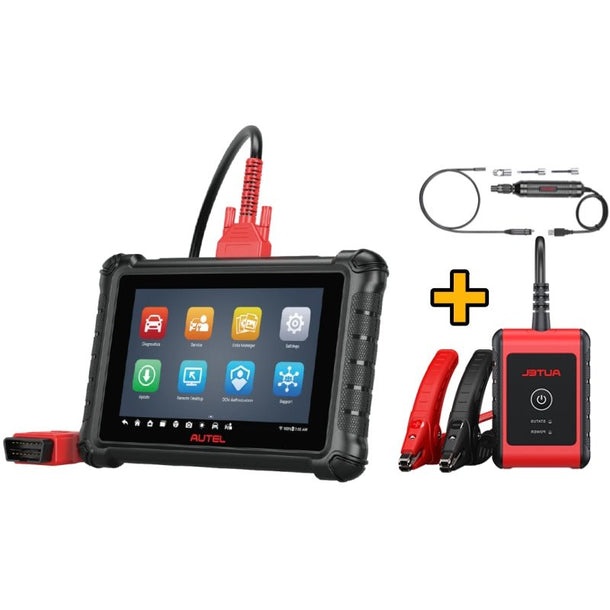
The MX900 is an 8-inch all-system diagnostic and service tablet designed to provide much more than basic engine-code scanning.
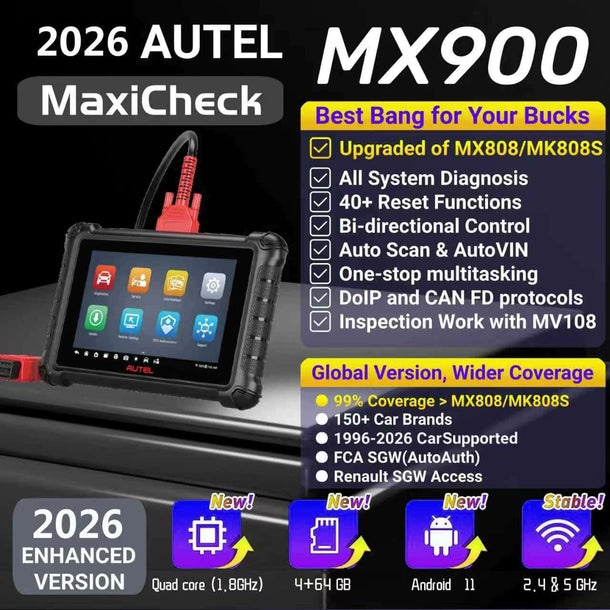
According to Autel-US, it supports reading and clearing diagnostic trouble codes, live data, active tests, ECU information, automatic VIN identification, full-system scanning, and more than 40 service and maintenance functions. The tablet runs Android 11 with a quad-core 1.8 GHz processor, 4GB of RAM, 64GB of onboard storage, and a 7,700mAh battery.
At the time of this review, Autel-US lists the MX900 at $519, reduced from a listed $599 price. The standard version includes one year of free software updates, while a five-year update option is also offered.
Quick verdict
Best for: DIYers, serious car enthusiasts, independent mechanics, and smaller repair shops that need all-system diagnostics and useful service functions.
Less suitable for: Buyers who only need basic OBD2 code reading, or professional users who specifically need advanced ECU coding, guided functions, or highly specialized ADAS/key-programming capabilities.
Overall: The MX900 looks like a strong middle-ground diagnostic tablet for buyers who have outgrown basic scanners but do not necessarily need Autel’s flagship-level equipment.
What Is the Autel MX900?
The MX900 is essentially a combination of an automotive diagnostic scanner and service tablet.
Instead of limiting itself to engine fault codes, it is designed to communicate with multiple vehicle control modules and provide access to diagnostic information across a much broader range of vehicle systems.
Autel-US describes it as an all-system scanner capable of working across systems such as ABS, SRS, ECM, TCM, BCM, brakes, and TPMS-related systems. The company also states that the MX900 can automatically retrieve vehicle information through Auto VIN and perform automatic system scans.
This distinction matters.
If you simply want to read and clear a check-engine light, spending several hundred dollars on a tablet like the MX900 may be unnecessary.
But if you want to investigate faults across multiple vehicle systems, view live data, perform active tests, and use service functions, the MX900 becomes much more interesting.
1. All-System Diagnostics Are the MX900’s Foundation
One of the biggest reasons to consider the MX900 is that it is not restricted to generic OBD2 diagnostics.
Autel-US says the scanner can automatically scan available modules across a broad range of American, European, and Asian vehicle makes and models. It can read and clear codes, display live data, retrieve ECU information, and perform active tests.
For a serious DIY mechanic or independent repair shop, this can make a significant difference.
Instead of simply getting:
Check Engine Light → Read Code → Clear Code
you can investigate information from different vehicle systems and use live data to understand what is happening.
That makes the MX900 much closer to a general-purpose diagnostic workstation than a traditional handheld code reader.
2. Bi-Directional Active Tests Make It More Useful for Diagnosis
One of the more important MX900 features is bi-directional control, also called active testing.
According to Autel-US, the MX900 can send commands to vehicle ECUs to activate certain components and systems. Examples listed by Autel include injector testing, fuel-pump control, air-conditioning cycling, clutch activation, oil-pressure testing, door and sunroof controls, and various valve and brake-related tests.
Why does that matter?
Because reading a fault code does not necessarily tell you which component has failed.
An active test can allow a technician to command a component and observe its response.
That can help narrow down whether the problem is related to:
- a component;
- an actuator;
- wiring;
- communication;
- or another part of the system.
For someone who only performs occasional code scans, this feature may not justify the price by itself.
For someone actually diagnosing vehicles, however, it can be much more valuable.
3. More Than 40 Service Functions
Another major selling point is the MX900’s service-function coverage.
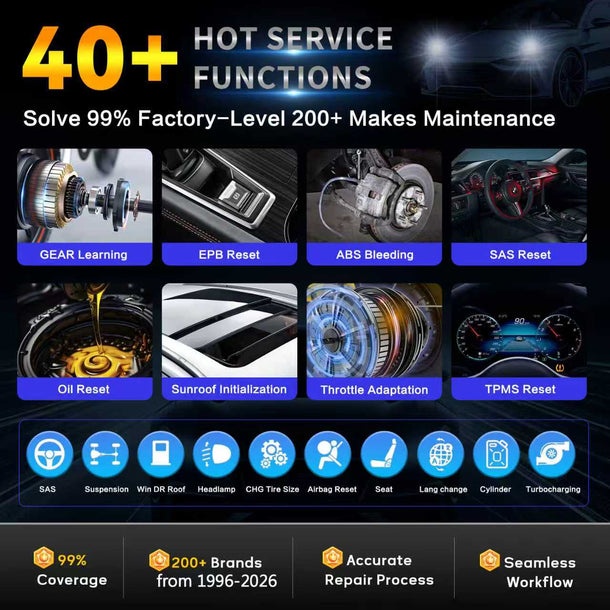
Autel-US lists more than 40 service and maintenance tasks, including functions such as:
- Oil reset
- Electronic parking brake reset
- Steering angle reset
- Battery registration
- Throttle reset
- ABS bleeding
- DPF regeneration
- Service-light resets
- Other maintenance-related functions
The exact functions available can vary by vehicle, so buyers should not assume that every listed function works on every make and model.
This is an important distinction when buying any diagnostic tool.
A manufacturer may advertise broad functionality, but actual coverage depends on the vehicle, model year, ECU configuration, and software support.
For that reason, vehicle compatibility should be checked before purchasing if you have a specific vehicle or diagnostic task in mind.
4. Auto VIN and Auto Scan Can Save Time
The MX900 supports Auto VIN and Auto Scan.
Autel says its VIN database allows the device to retrieve vehicle information and conduct system scans automatically. The company also states that the scanner supports more than 10,000 OBD2/EOBD vehicles.
For professional users, saving a few minutes on every diagnostic session can add up.
The scanner also includes data-management functionality that can store vehicle information, diagnostic data, and technician notes. Autel says diagnostic reports can be uploaded to its cloud system, while its Data Manager can retain customer and vehicle records.
That makes the MX900 more useful as a working diagnostic tablet rather than simply a device you plug into a vehicle once in a while.
5. Hardware: Is the MX900 Powerful Enough?
The MX900 uses:
- Android 11
- Quad-core 1.8GHz processor
- 4GB RAM
- 64GB onboard storage
- 8-inch touchscreen
- 1280 × 800 resolution
- 7,700mAh battery
- Wi-Fi connectivity
- 8MP rear camera
Autel lists an operating temperature range of 0°C to 50°C.
The 8-inch display is particularly useful for diagnostic work because live-data graphs, menus, fault-code information, and vehicle-system diagrams are easier to view on a tablet-sized screen than on a small handheld scanner.
The 7,700mAh battery is also considerably larger than the battery listed for older MX808/MK808-class devices in Autel’s own comparison table.
6. MX900 vs Basic OBD2 Scanners
This is perhaps the easiest way to decide whether the MX900 makes sense for you.
If your needs are simply:
Read a check-engine code.
Clear a basic code.
Check generic OBD2 information.
then the MX900 may be more scanner than you need.
But if you want:
Full-system diagnostics
Live data
Active tests
Service functions
Auto VIN
Vehicle-system scanning
Diagnostic reports
then you are looking at a completely different category of tool.
The MX900 makes much more sense for someone who expects to use a diagnostic scanner repeatedly rather than occasionally.
7. Is the MX900 an Upgrade From the Older MX808/MK808 Family?
Autel-US positions the MX900 as an upgrade/replacement for the older MX808/MK808 class of products.
According to the manufacturer’s comparison, the MX900 has a faster 1.8GHz processor, 4GB RAM, 64GB storage, an 8-inch display, and a 7,700mAh battery, compared with the older MX808 configuration listed by Autel.
The MX900 also adds capabilities such as Auto VIN, pre- and post-scan support, and DoIP/CAN FD support according to the manufacturer’s comparison table.
For an owner of an older scanner, the question is therefore not simply:
“Is the MX900 better?”
It is:
“Do I need the additional capabilities enough to justify upgrading?”
If your existing scanner already handles everything you normally do, upgrading may not be necessary.
If you frequently encounter vehicles or diagnostic jobs that exceed your current tool’s capabilities, the MX900 becomes considerably more compelling.
8. One Important Limitation: It Is Not an Everything Scanner
This is where buyers need to be realistic.
The MX900 is capable, but it is not designed to replace every specialized Autel tool.
For example, Autel’s own comparison information shows the MX900 does not provide ECU coding or guided functions in the same way as some higher-level diagnostic platforms.
Similarly, if your primary requirement is advanced TPMS service, key programming, ADAS calibration, EV diagnostics, or highly specialized professional diagnostics, you should look at the Autel tools specifically designed for those jobs.
This is actually one of the reasons I would not describe the MX900 as simply “the best Autel scanner.”
A better description is:
A capable mid-range all-system diagnostic and service tablet for users who need considerably more than basic OBD2 scanning.
9. Who Should Buy the Autel MX900?
DIY Mechanics
The MX900 makes sense for a serious DIY mechanic who wants to diagnose more than check-engine codes.
If you regularly work on your own vehicles and want access to live data, active tests, system scans, and service functions, the MX900 offers a significant step up from a basic scanner.
Independent Mechanics
For an independent technician, the combination of all-system diagnostics, active testing, service functions, Auto VIN, and data management is more relevant.
The ability to use one tablet for a broad range of everyday diagnostic tasks can be more practical than maintaining several basic scanners.
Small Repair Shops
The MX900 may also fit smaller shops that need a general diagnostic tool without immediately moving to one of Autel’s most expensive professional platforms.
At this price level, the key question is whether its coverage matches the vehicles that enter your shop.
10. Who Probably Shouldn’t Buy It?
Casual car owners
If you only want to check an occasional check-engine light, a much simpler OBD2 scanner may be enough.
Buyers expecting unlimited advanced functions
The MX900 should not be treated as a substitute for every high-end Autel platform.
If you need advanced ECU coding, guided functions, specialized key programming, ADAS work, or other advanced capabilities, you should compare the MX900 with the appropriate higher-tier or specialized Autel tool first.
Buyers who have not checked vehicle compatibility
This is perhaps the biggest mistake to avoid.
Do not buy a diagnostic scanner based only on a list of advertised functions.
Start with your actual vehicles and actual jobs.
Ask:
Does this tool support the functions I need on my specific vehicles?
That question is more useful than simply asking whether the scanner has “40+ service functions.”
11. What About Software Updates?
The current MX900 listing includes one year of free software updates, with a five-year update option available as a product variant.
This is important when calculating the true cost of ownership.
The purchase price is not necessarily the only cost you should consider when buying a professional diagnostic tool.
Before purchasing, check the current update options for the exact MX900 configuration you intend to buy and consider how long you expect to keep the scanner.
For a tool that may remain in service for several years, update costs can become part of the buying decision.
12. Current Price and Value
Autel-US currently lists the MX900 at $519, compared with a listed $599 price. The product page also shows a five-year update option and currently displays a 4.86/5 rating from seven reviews.
At roughly the $500 level, the MX900 sits in an interesting position.
It is too expensive to make sense as a simple code reader.
But for someone who will actually use its all-system diagnostics, active tests, service functions, and live-data capabilities, the value proposition becomes much stronger.
The key is utilization.
A $519 diagnostic tool that gets used every week can make much more sense than a $100 scanner that technically does everything you need but lacks important diagnostic functions.
Autel MX900: Pros and Cons
Pros
- All-system diagnostics
- Bi-directional active tests
- More than 40 service functions
- Auto VIN and Auto Scan
- Live-data viewing and graphing
- 8-inch touchscreen
- 4GB RAM and 64GB storage
- 7,700mAh battery
- DoIP and CAN FD support listed by Autel
- Diagnostic data and report management
- One year of free updates included
Cons
- Wired vehicle connection
- Not designed to replace Autel’s highest-end diagnostic platforms
- ECU coding and guided functions are not its strongest area
- Advanced specialized jobs may require another Autel tool
- Long-term software-update costs need to be considered
- Compatibility varies by vehicle and function
Final Verdict: Is the Autel MX900 Worth Buying?
For the right buyer, yes.
The Autel MX900 makes the most sense for someone who has moved beyond basic OBD2 scanning and wants a more capable diagnostic platform without immediately spending several thousand dollars on a flagship professional scanner.
Its combination of all-system diagnostics, live data, bi-directional active tests, more than 40 service functions, Auto VIN, and an 8-inch tablet interface gives it a much broader role than a basic code reader.
But I would not recommend buying it simply because it has a long feature list.
The better question is:
Does the MX900 support the diagnostic jobs you actually perform?
If you are a DIY mechanic who wants deeper diagnostics, an independent technician handling a variety of everyday vehicles, or a small repair shop looking for a general-purpose diagnostic tablet, the MX900 deserves serious consideration.
If your work requires advanced ECU coding, guided functions, ADAS, key programming, EV-specific diagnostics, or other specialized capabilities, you should move further up or across Autel’s product range rather than assuming the MX900 will cover everything.
Bottom line
The MX900 is best viewed as a capable mid-range all-system diagnostic and service tablet — not a basic scanner and not a flagship replacement.
If that is exactly the level of capability you need, its current price makes it one of the more interesting Autel models to investigate.
Where to Check the Current Autel MX900 Price
For the latest price, configuration, update options, warranty information, and availability, check the current product listing on Autel-US.
If you decide to purchase through DealVit, use the PHAMDUCBAC coupon code where applicable to receive the available DealVit discount, and access the store through the DealVit affiliate link so the purchase can be properly attributed.
Affiliate disclosure: DealVit may earn a commission if you purchase through our affiliate link. This does not increase your purchase price.
Related Autel Guides on DealVit
If you are still deciding which Autel scanner is right for you, continue with our broader Autel buying guide and upcoming model comparisons. The goal is not simply to recommend the most expensive scanner, but to help you choose the model that matches your actual diagnostic needs and budget.